Etsy Listing Photo Size: Dimensions, Thumbnails and Tips
The photo sizes Etsy recommends, how your first photo gets cropped into thumbnails, and simple tips to make every listing look sharp, with numbers taken from Etsy's help center.
By Ankur Sharma, Founder, ShotKart · Published · Updated
Quick answer: Etsy recommends listing photos that are at least 2000 pixels wide and tall. Your first photo must be at least 635 pixels on each side or it can show up lower in search. Keep files around 1 MB, use JPG or PNG in sRGB, and leave a border so thumbnail crops never cut off your item.
On this page
Choosing the right Etsy listing photo size decides how sharp your items look in search, how your thumbnail gets cropped, and whether your photos upload at all. Etsy buyers make a decision from a small thumbnail in a crowded grid, so getting the size and framing right is worth ten minutes of your time.
Here is what Etsy's help center recommends, what it means for your shop, and a few tips that make the biggest difference.
The recommended Etsy listing photo size
Etsy recommends listing photos with a width and height of at least 2000 pixels. Larger photos stay sharp when buyers zoom in, and they look crisp on high-resolution phone and laptop screens.
There is also a hard minimum for your first photo: it should be at least 635 pixels wide and tall, or the listing can show up lower in search results. In practice, any modern phone photo is far above that, so the real risk is cropping a photo down too far.
Etsy photo size at a glance
| Setting | What Etsy says | What to use |
|---|---|---|
| Recommended size | At least 2000 px wide and tall | 2000 px or more on the shortest side |
| First photo minimum | At least 635 px wide and tall | Never crop below 2000 px |
| Shape | Landscape or square first photo; match it for the rest | Landscape, for example 2700 x 2025 px (4:3) |
| File size | Images over 1 MB may fail to upload | Around 1 MB or less |
| File types | .jpg, .gif, .png, .svg or .heic | JPG for photos |
| Transparency | Transparent PNGs aren't supported (shows black) | Solid background |
| Colour | Convert to sRGB | sRGB |
How Etsy crops your thumbnail
Your first photo isn't shown the same way everywhere. Etsy crops thumbnails into square, portrait and landscape views depending on where the listing appears: search results, your shop page, the app and ads.
That's why the most important rule for Etsy photos is simple: keep your item centered with a generous border. If a necklace runs to the edge of the photo, the square crop chops it off. If a print fills the whole frame, the portrait crop loses the sides.
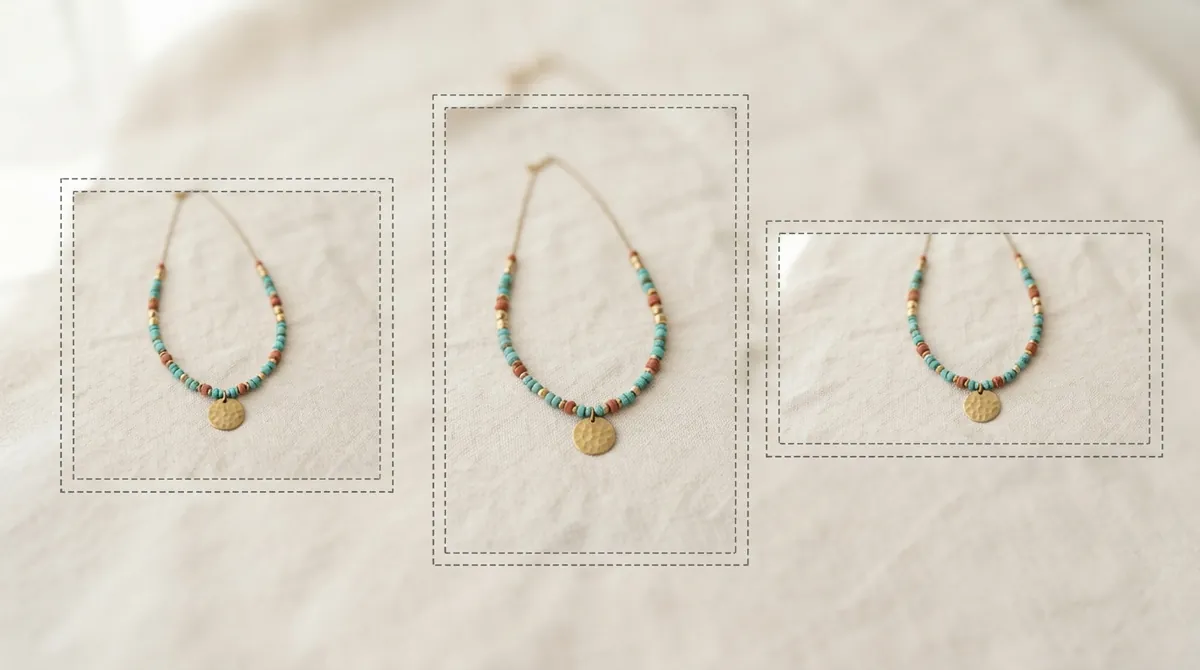
When you upload, use Etsy's thumbnail adjustment tool to preview the crop and drag it so the item sits in the middle. Check it on your phone too, since most Etsy shoppers browse in the app.
Want a clean first photo without a studio? Upload one phone photo and ShotKart gives you a centered studio shot plus lifestyle and on-model images for the rest of your listing.
Try it free, no signupFile size, format and colour
- Keep files around 1 MB. Etsy notes that larger images may fail to upload, especially on slow connections. A 2700 px JPG at quality 80 usually fits.
- Use JPG for photos. It keeps files small. Use PNG only for graphics, and never with a transparent background, since transparent areas show as black.
- Convert to sRGB. Etsy recommends sRGB so the colours buyers see match your item. CMYK files are for print and look dull on screens.
- Shoot at full resolution. Take photos at your phone's highest quality so you still have more than 2000 px after cropping.
Tips for Etsy photos that get clicks
- Make the first photo simple. A plain, bright background stands out in a busy search grid. Save styled scenes for photos two and three.
- Use the same shape for every photo. Etsy suggests matching your other photos to the first one, so the gallery doesn't jump between shapes.
- Show scale. Earrings on an ear, a mug in a hand, a print on a wall. Wrong guesses about size lead to returns and bad reviews.
- Add a detail close-up. Texture, stitching, glaze and maker's marks show the quality of handmade work.
- Shoot in daylight. Soft window light beats a ceiling bulb every time. Avoid direct sun, which creates harsh shadows.
- Keep your shop consistent. When every first photo uses the same background and lighting, your shop page looks curated instead of improvised.
- Stay accurate. Etsy buyers expect the photos to show the real item. Never use an image that changes the colour, size or condition of what you're selling.
- Include one unedited photo. Etsy's image rules (updated in late 2026) require most listings to include at least one unedited photo of the actual item, which you may only crop, resize, watermark or convert. If you use AI to edit any listing photo, note it in your listing description. See how to remove background for Etsy product photos.
A simple Etsy photo set
For most listings, aim to include:
- A clean first photo on white or a soft colour, centered with a border
- Two lifestyle scenes that match your shop's style
- A scale or on-model shot
- A detail close-up taken on your phone
- A variant shot if the item comes in other colours
- At least one unedited photo of the real item (required for most listings)
Making the first photo faster
The first photo is the one that wins or loses the click, and it's also the hardest to get right at home: a clean background, even light and a centered item. This is where AI helps. ShotKart can replace the background behind your item, keeping the item itself exactly as you photographed it, so you get a clean first photo from a kitchen-table snapshot. Generated lifestyle and on-model scenes then fill out the rest of the listing. Always compare every image with your real item before you publish.
For more ideas, read our AI product photos for Etsy guide or see the Etsy product photos page. Selling jewelry? Read how to photograph jewelry for Etsy.
FAQ
What size should Etsy listing photos be?
Etsy recommends a width and height of at least 2000 pixels. Your first photo should be at least 635 pixels on each side, because smaller first photos can show up lower in search.
What aspect ratio is best for Etsy photos?
Etsy suggests a landscape or square first photo and using the same shape for the rest of your photos. Because thumbnails are cropped into different shapes, keep your item centered with space around it.
Why does my Etsy thumbnail cut off my product?
Etsy crops thumbnails into square, portrait and landscape views in different places on the site. If your item touches the edge of the photo, part of it gets cut off. Center the item and leave a border, then check it with the thumbnail adjustment tool.
Can I upload transparent PNGs to Etsy?
No. Etsy doesn't support transparent PNGs, and transparent areas show up black. Put your product on a solid background before uploading.
What file size should Etsy photos be?
Etsy notes that images over 1 MB may fail to upload, especially on slow connections. Save your photos as JPGs at a good quality setting to keep them around that size.