Shopify Product Image Size: Dimensions, Format and File Size
Everything a small Shopify store needs to know about product photo dimensions, aspect ratio, file size and format, with the numbers taken from Shopify's own help center.
By Ankur Sharma, Founder, ShotKart · Published · Updated
Quick answer: For square product images, Shopify says 2048 x 2048 px usually displays best. Images can be up to 5000 x 5000 px (25 megapixels) and must be under 20 MB. Use one aspect ratio for every product so your collection pages line up.
On this page
Getting your Shopify product image size right is one of the easiest wins for a small store. The right size keeps photos sharp when shoppers zoom, makes your collection pages line up neatly, and stops uploads from failing. The wrong size gives you blurry zooms, a messy grid and a store that looks less trustworthy than it is.
This guide gives you the numbers from Shopify's own help center, explains what they mean in practice, and shows you how to make every product photo in your store match.
The recommended Shopify product image size
Shopify's help center says that for square product images, a size of 2048 x 2048 px usually displays best. That size gives shoppers a sharp image when they zoom in on desktop, looks crisp on high-resolution phone screens, and keeps the file small enough to load quickly.
You don't have to use exactly 2048 px. Anything from about 2000 px upward on each side works well. Going much smaller is where problems start: an 800 px photo can look fine in the grid but turns soft as soon as a shopper zooms.
Shopify image limits at a glance
| Setting | What Shopify says | What to use |
|---|---|---|
| Recommended size | 2048 x 2048 px usually displays best for square images | 2048 x 2048 px |
| Maximum dimensions | Up to 5000 x 5000 px or 25 megapixels | Stay at or below 4000 x 4000 px to be safe |
| Maximum file size | Smaller than 20 MB | Aim for under 1 MB |
| Best formats | PNG first, then JPEG | JPEG for photos, PNG for graphics |
| Other accepted formats | WebP, HEIC, GIF, TIFF, BMP, SVG | Convert unusual formats before uploading |
| Aspect ratio | Use a consistent ratio for featured images | 1:1 square for most stores |
Aspect ratio: why square is the safe default
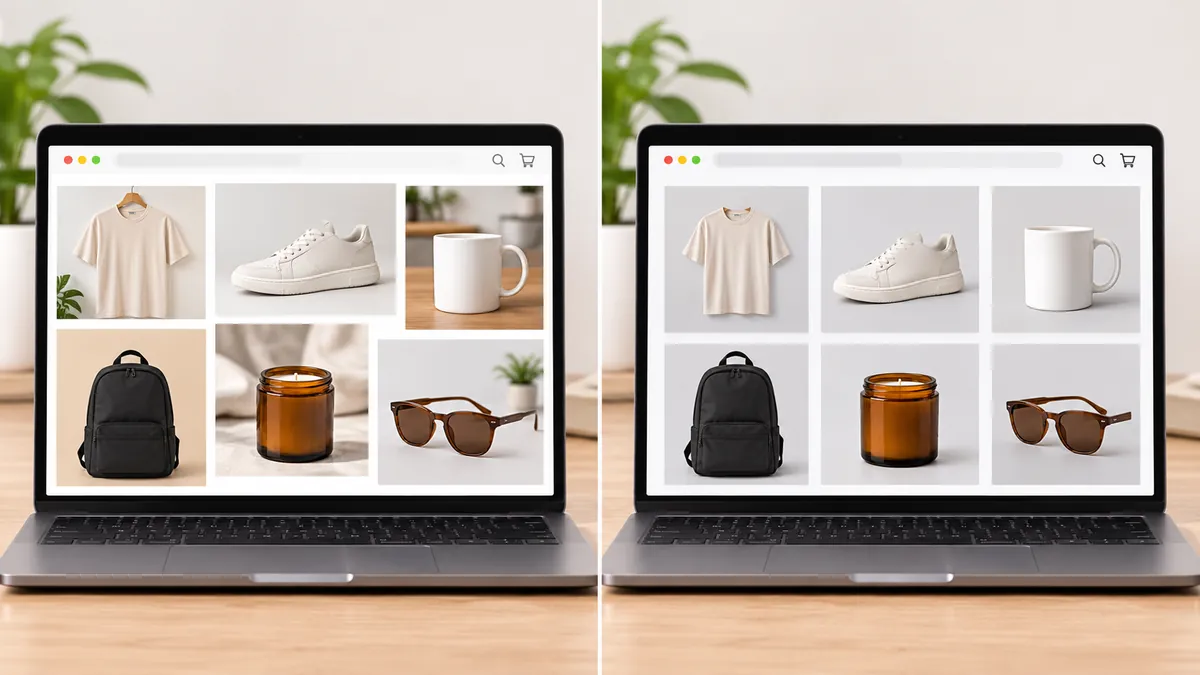
Most Shopify themes show products in a grid of square tiles. If you upload a mix of tall, wide and square photos, the theme either crops them unpredictably or leaves uneven gaps, so your collection page looks unfinished.
Shopify's help center says to use a consistent aspect ratio for featured images so they appear the same size on collection pages. For most stores that means 1:1 square. Some fashion stores prefer a portrait ratio such as 4:5 because it shows more of an outfit; that works too, as long as every product uses it. Check your theme's settings: many themes let you choose how product images are cropped in the grid.
No studio? No problem. Upload one phone photo and ShotKart turns it into clean, square studio and on-model shots you can put straight into your Shopify store.
Try it free, no signupFile size and format
The upload limit is 20 MB, but a fast store needs much smaller files. Here is a simple approach:
- Use JPEG for photos. It keeps file sizes small with no visible loss at good quality settings.
- Use PNG for graphics, logos and anything with sharp text. Shopify's help center ranks PNG as the best type for most product images, so PNG is fine for photos too if the file size stays reasonable.
- Compress before uploading. A 2048 px JPEG usually lands well under 1 MB at a quality setting around 80.
- Don't worry about WebP conversion. Shopify delivers optimized versions of your images to shoppers automatically.
- Name your files clearly, like
blue-linen-shirt-front.jpginstead ofIMG_4821.jpg. It helps image search.
Common Shopify image mistakes
- Mixing aspect ratios. The most common reason a collection page looks messy.
- Uploading tiny images. Photos under about 1000 px look blurry when zoomed.
- Uploading huge camera files. A 50 MB original either fails or slows your workflow. Resize first.
- Inconsistent backgrounds. One product on white, the next on a kitchen counter, the next on a bed. Shoppers notice.
- Products filling different amounts of the frame. Even with the same ratio, a shirt that fills 90% of one photo and 50% of the next looks uneven.
- Forgetting alt text. Shopify lets you add alt text to every image. Describe the product plainly for accessibility and search.
How to make every product image consistent
A consistent store looks like a real brand, and that builds trust. You don't need a studio to get there:
- Pick one background for your main images: pure white, light grey or one soft brand colour.
- Pick one aspect ratio and one size, such as 2048 x 2048 px.
- Keep spacing similar. Let the product fill roughly 80 to 90% of the frame in every main image.
- Use the same light. Daylight from a window at the same time of day gives similar colour across shoots.
- Batch your editing. Process a whole set at once with the same settings instead of one photo at a time.
If your photos were taken at different times and places, AI can make them match. ShotKart replaces the background behind your product and outputs a clean studio-style image, so a shirt shot on a bed and a mug shot on a desk can end up with the same backdrop and lighting. You can also add lifestyle scenes and on-model shots so each product page has more than one angle. See our Shopify product photos guide for ideas on what to shoot.
What photos should each Shopify product have?
Size is only half of it. Each product page should give shoppers enough to decide without touching the item:
- A clean main image on a plain background, used in the collection grid.
- Two or three angles, such as front, back and side.
- A lifestyle or on-model shot showing the product in use.
- A detail close-up of material, texture or stitching.
- A scale shot so buyers know how big it really is.
Use the same size and ratio for all of them so the product gallery doesn't jump around as shoppers swipe.
Quick checklist
- 2048 x 2048 px, or at least 2000 px on each side
- One aspect ratio across the whole store (1:1 for most themes)
- JPEG for photos, under about 1 MB each
- Same background and spacing on every main image
- Clear file names and alt text
Get these right once and every new product you add will look like it belongs. For more on presenting products, read our AI product photography guide.
FAQ
What is the best image size for Shopify products?
Shopify's help center says a 2048 x 2048 px image usually displays best for square product images. It is large enough for zoom and sharp on high-resolution screens, while staying well under the upload limits.
What is the maximum image size on Shopify?
Product and collection images can be up to 5000 x 5000 px or 25 megapixels, and the file must be smaller than 20 MB.
Should Shopify product images be square?
Square is the safest default because most themes show products in a square grid. What matters most is using the same aspect ratio for every product, so collection pages look even.
Which file format is best for Shopify product photos?
Shopify recommends PNG first and JPEG second for most product images. It also accepts WebP, HEIC, GIF, TIFF, BMP and SVG. Shopify serves optimized versions to shoppers automatically.
Why do my Shopify product images look different sizes?
Your photos have different aspect ratios or the product fills a different amount of each frame. Crop every image to the same ratio and keep similar spacing around the product.